
Elf
Bridging the gap between design and code
- github.com/nonyonah/elf
- elf-docs.riftlabs.xyz
- TypeScript, Figma Plugin API, MCP, VS Code
The Problem
Design and code don't always speak the same language.
Designers create components, variables, and styles in Figma. Developers translate them into code. But as products evolve, both environments gradually drift apart.
A color changes in Figma but stays the same in code. A developer updates a component without reflecting that change in the design file.
These inconsistencies are often discovered during reviews or after implementation, creating unnecessary back-and-forth.
I wanted to solve a simple problem: What if designers and developers could detect these differences early and keep both environments synchronized without constantly switching tools?
That's how Elf started.
Starting Small
One problem, one tool.
My initial idea was a command-line tool that compared Figma design tokens against tokens in a codebase and reported differences in pull requests.
I deliberately kept the scope narrow. I didn't want to build another design system management platform before proving the core workflow.
But while exploring two-way synchronization, I encountered a technical constraint.
The Figma REST Variables API capabilities I needed were restricted to Enterprise plans. Building Elf around that requirement would exclude many independent designers and developers, including people like me who couldn't justify the subscription cost.
So I explored another approach.
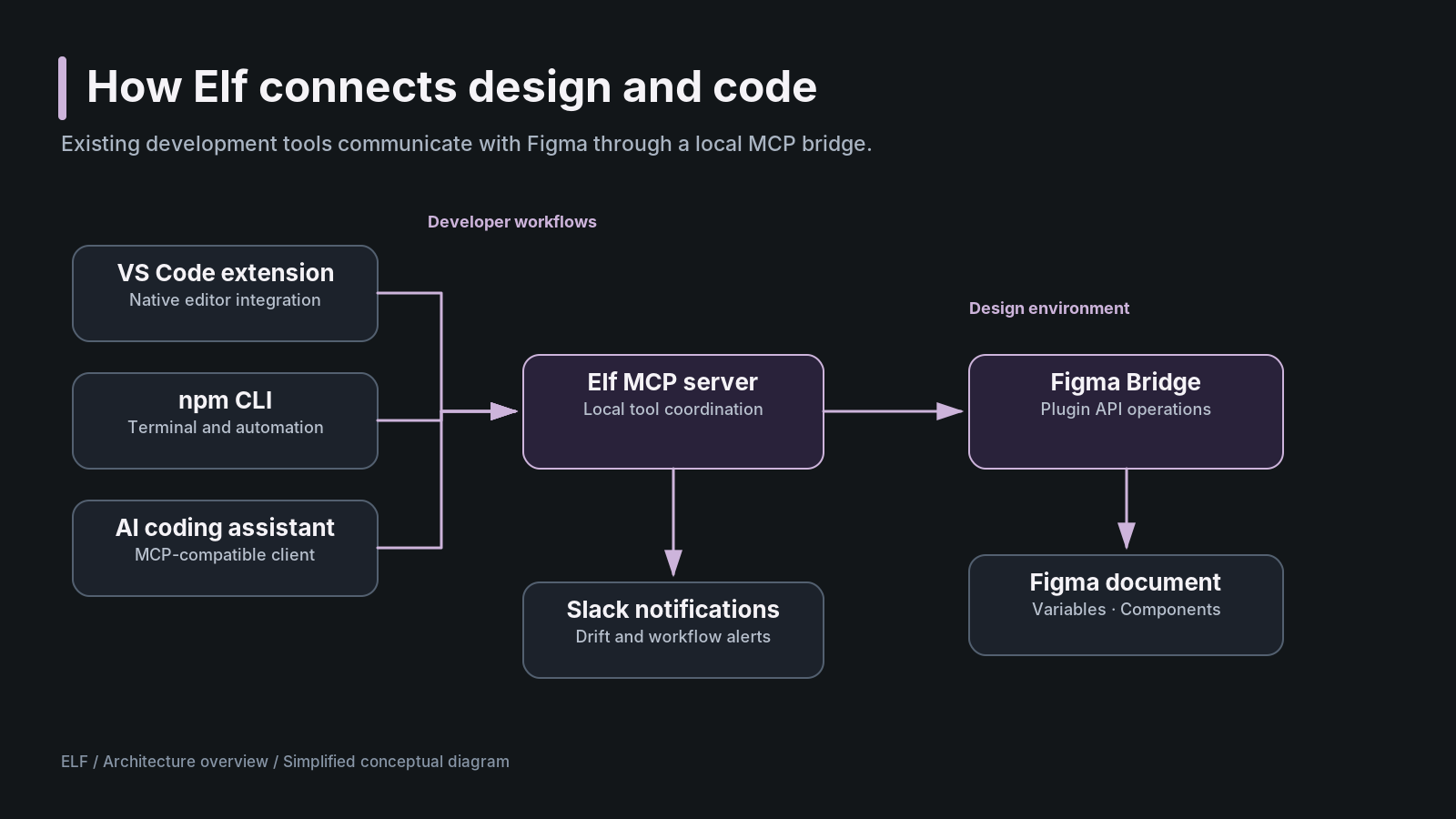
Instead of relying entirely on Figma's REST API, I built a bridge using the Figma Plugin API and a local Model Context Protocol (MCP) server.
This allowed development tools to communicate with Figma through a plugin running inside the design environment.
A platform limitation had fundamentally shaped the architecture.
Building the Experience
Bringing Elf into existing workflows.
As the architecture evolved, I expanded Elf beyond the original CLI.
Rather than creating a separate dashboard that everyone would have to visit, I focused on integrating with tools designers and developers already use.
Elf now includes:
- VS Code extension: A native editor experience for inspecting changes, managing connections, and working with design systems.
- npm package: Command-line tooling for monitoring differences and synchronizing supported changes.
- Figma Bridge: A plugin that allows Elf to interact directly with Figma documents.
- MCP integration: Allows compatible AI coding assistants to inspect and create design resources.
- Slack notifications: Keeps teams informed about design drift and relevant activity.
I initially explored a webview for the editor interface but eventually moved toward native VS Code integration because it felt more consistent with the developer's existing environment.
I also built Elf's visual system around a dark base color, #121619, generating light and dark palettes programmatically and validating 78 contrast combinations against WCAG requirements, with zero failures in the tested set.
When Figma Rejected Elf
A working product still needs a way to reach users.
After building the Figma integration, I submitted the plugin to Figma's marketplace.
It was rejected.
The review raised concerns about functionality overlapping with Figma's native features and the plugin's connections to external tools, including the VS Code extension and npm workflow.
This was a significant setback because connecting those environments was the entire point of Elf.
I had to decide whether to redesign the product around the marketplace requirements or find another distribution approach.
I chose the latter.
Users can now install Elf Bridge manually by importing its manifest.json through Figma's development-plugin workflow.
It's not as convenient as marketplace installation, but it allows the existing functionality to remain intact.
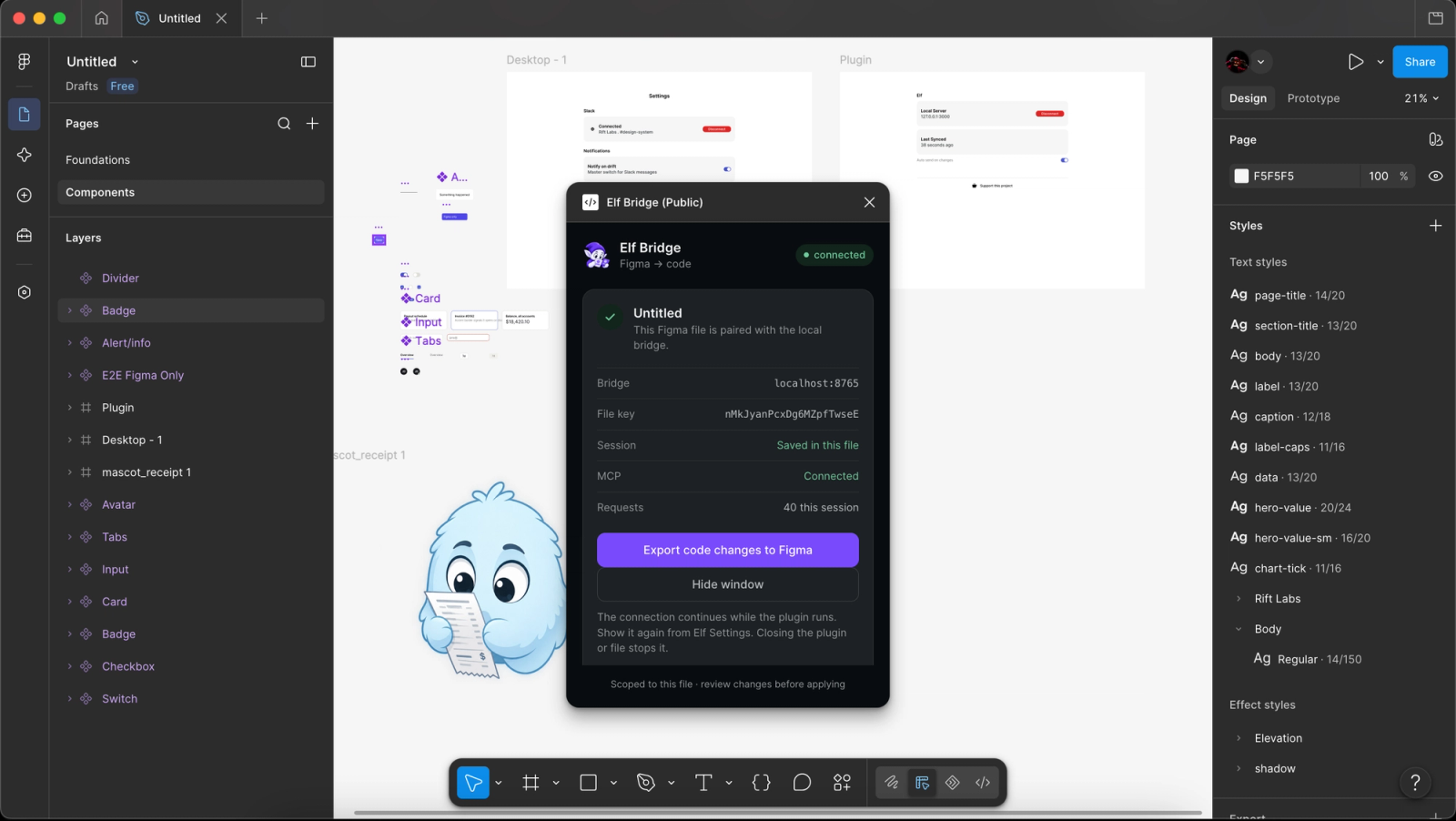
This also forced me to improve the onboarding experience. I consolidated scattered setup instructions into a Quickstart guide so users could understand how the different integrations work together.
The lesson: Product constraints don't end at engineering. Platform policies and distribution can influence the entire user experience.
Putting Elf to the Test
From a Markdown file to Figma variables and components.
I wanted to test whether Elf could do more than detect design drift. Could it actually create design system resources inside Figma?
Using Elf's MCP integration, I provided an AI coding assistant with a Markdown file describing a design system.
Elf interpreted the specification and used Figma Bridge to generate variables and components directly inside Figma. The generated components were also placed on the canvas, making them available for inspection and editing.
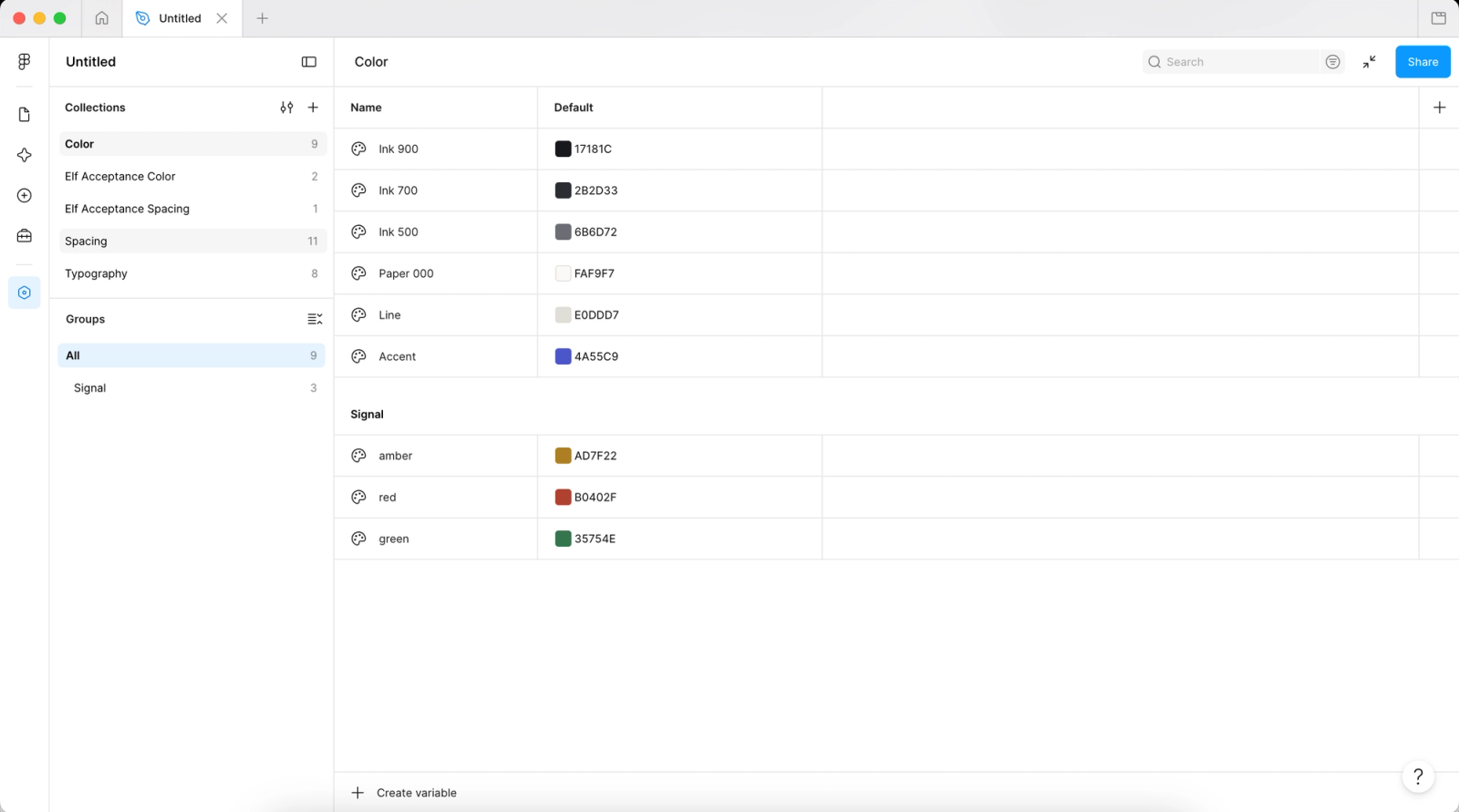
The workflow worked end to end.
In my testing, the generated resources were approximately 95% accurate to my expectations, although some components still had visual inconsistencies.
One limitation was presentation. While Elf created the actual design system resources, it didn't organize them into a polished design system showcase with neatly arranged sections, documentation, and examples.
That wasn't the primary goal of the workflow. I was testing whether Elf could translate a written specification into usable Figma resources, not whether it could automatically design a presentation page.
The result: Elf successfully generated variables and components from a Markdown specification, demonstrating that the MCP-to-Figma workflow could create editable design resources.
Status: Resource generation works. Component fidelity and automatic canvas organization still need improvement.
Reflections & What's Next
Elf has evolved from a small CLI experiment into a working developer tool connecting Figma, code editors, AI assistants, and team notifications.
The biggest lessons came from decisions I didn't anticipate making.
Figma's API limitations changed the architecture. Designing the pairing experience led me to replace static authentication tokens with short-lived pairing codes and separate session credentials. Marketplace rejection changed distribution. And testing the generated components revealed where the product still needed improvement.
Throughout development, I've tried to prioritize the core workflow over adding features simply because I could.
Where things stand: Elf is in beta, with working integrations and successful end-to-end tests. My next priorities are improving component generation accuracy, simplifying installation, and validating the experience with more users and projects.
There's still work to do, but Elf has already demonstrated the idea that started it:
Design and development shouldn't have to drift apart.